

Roles and permissions
Who can do what — individuals, members, admins, and owners — and why a control can be missing.
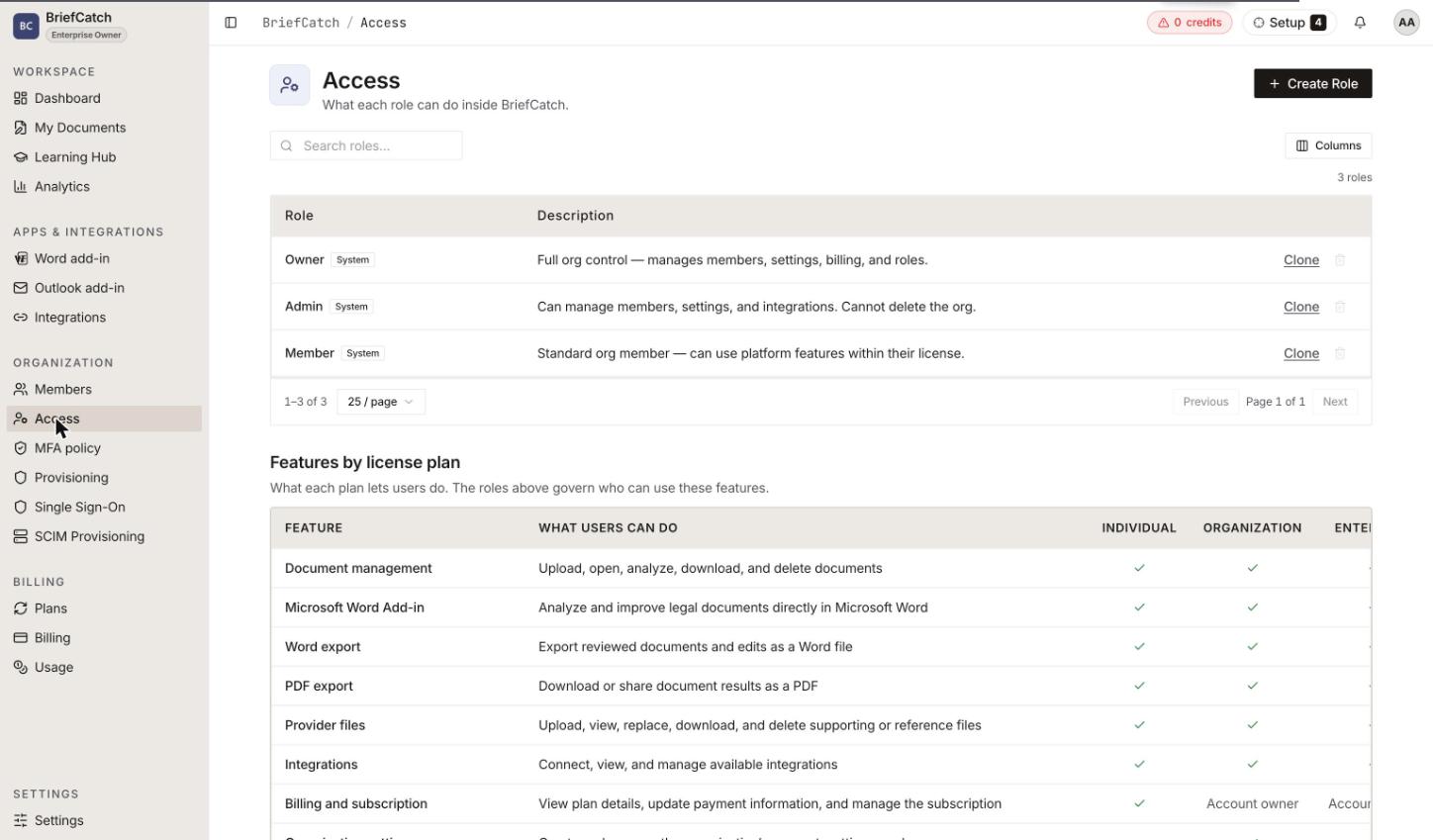
Permissions resolve from two independent facts: your organization’s license and your role. If a control is missing, that is almost always the answer, and this page tells you which half to check.
Two things decide what you can do
The license says what the account is entitled to
A feature the plan does not include is unavailable to everyone on that account, regardless of role. Enterprise-only capabilities like SCIM are the clearest case.
The role says what you personally may do with it
Inside an organization, administrative capability comes from your role. Holding a role that could manage something does not help if the license never unlocked it, and a license that unlocks something does not help if your role does not carry it.
This is why two people on the same plan can see different screens, and why the same person can see different screens in two organizations.
The people using BriefCatch
Individual
No organization. Owns their own subscription, their own credits, and their own documents, and can create an organization to move onto a team plan.
Member
Belongs to an organization and works under its license. Uses the product; changes nothing about the organization.
Admin
Runs the organization day to day: people, roles, settings, and integrations. Not the subscription.
Owner
The broadest role. Everything an admin can do, plus the subscription and the destructive account decisions. The person who created the organization starts as owner.
An account can belong to more than one organization, with a different role in each. The organization picker in the header sets which one is active, and every permission question is answered against that one.
Important notes about the Owner role
- Billing management is owner-only, and the screens are hidden rather than blocked. An admin does not see Billing or Subscription in the navigation at all. There is no error to retry.
- Buying credits is the exception. Admins can buy top-ups even though they cannot reach Billing. See Credits below.
- An admin can promote and demote members, but only an owner can grant or revoke the owner role.
- An organization should always have an owner. If yours appears not to, contact support rather than working around it.
What each role can do
Individuals sit outside these tables. With no organization there is no role to hold, so an individual gets whatever their license grants, plus full self-service over their own subscription and credits.
Documents and review
| Member | Admin | Owner | |
|---|---|---|---|
| Upload documents | ✅ | ✅ | ✅ |
| Review documents and view suggestions | ✅ | ✅ | ✅ |
| Delete documents | ✅ | ✅ | ✅ |
| Export to PDF and clean DOCX | ✅ | ✅ | ✅ |
| Use the Word add-in | ✅ | ✅ | ✅ |
| Connect a personal drive and save files to it | ✅ | ✅ | ✅ |
Review capability is a license question, not a role question. Every role reviews documents; whether RealityCheck is included at all depends on the plan.
People and settings
| Member | Admin | Owner | |
|---|---|---|---|
| View the member list | — | ✅ | ✅ |
| Invite, remove, and re-role members | — | ✅ | ✅ |
| Change organization settings | — | ✅ | ✅ |
| Manage organization-wide integrations | — | ✅ | ✅ |
| Manage licenses and assignments | — | ✅ | ✅ |
| Manage SCIM provisioning (Enterprise) | — | ✅ | ✅ |
| Grant or revoke the owner role | — | — | ✅ |
Billing and subscription
| Member | Admin | Owner | |
|---|---|---|---|
| See Billing and Subscription in the app | — | — | ✅ |
| Change the plan, seats, or payment method | — | — | ✅ |
| View and pay invoices | — | — | ✅ |
Credits
Credits follow a different rule from the rest of billing, because buying them is a routine operational act rather than a change to the contract.
| Member | Admin | Owner | |
|---|---|---|---|
| See the remaining balance | ✅ in the header | ✅ | ✅ |
| Open the Usage and credits screen and its ledger | — | ✅ | ✅ |
| Spend credits by running RealityCheck | ✅ | ✅ | ✅ |
| Buy a credit top-up | — | ✅ | ✅ |
In practice, buying credits is an admin or owner action. A member sees the remaining balance in the header but cannot open the Usage and credits screen, which is where the purchase controls live.
There is an organization policy that permits member self-purchase, and it is off by default, but turning it on does not currently give members a route to the checkout — the screen carrying it is still admin-only. Treat topping up as something to ask an admin for. See Usage and credits.
Key differences
The distinction that explains most missing controls: an admin runs the organization, an owner owns the contract. Admins manage people, settings, integrations, licenses, and provisioning. Owners do all of that plus the subscription, the payment method, and the owner role itself.
Credits are the one place that line does not hold: buying them is open to admins, because running out of credits stops work and the fix should not require the one person who holds the card.
Membership states
A person in an organization is in one of three states:
- Pending — created by an invitation. They have no password and cannot sign in until they accept the invitation from the invited address.
- Active — a normal account.
- Deactivated — disabled. They keep their membership record but cannot sign in.
Removing a member can cut their access to organization resources. Confirm any document handoff before removing someone.
Custom roles
Any organization admin can go beyond member, admin, and owner and define custom roles against the same permission vocabulary, from Roles in the left navigation. Which permissions a role may carry depends on what your plan includes, so the ceiling is a licence question rather than a role one.
SCIM provisioning, which keeps membership in step with your directory automatically, is Enterprise-only. See Identity management and Teams and organizations.
When a control is missing
Work down this list before reporting a bug:
- Is the right organization active? The picker in the header decides which membership applies.
- Does your role carry it? Compare against the tables above.
- Does the plan include it? Enterprise-only features are absent on lower plans. See Plans and licenses.
- Is the license active? A lapsed license makes the whole account read-only. See Plans and licenses.
If all four check out and the control is still missing, that is worth reporting. See Troubleshooting.
Related
- Teams and organizations — invitations, SSO, SCIM, and pooled credits
- Plans and licenses — what each plan entitles the account to
- Usage and credits — what spends a credit, and who can buy more
- Subscription — changing the plan and seat count
- Billing — invoices and payment method